The Forge Blog
Reorder Point and Safety Stock: When and How Much to Order
Set the reorder point and safety stock for an item from its demand and lead time, see the order to place today, and check every assumption.
If you plan inventory for a distributor, a branch or a plant stockroom, you make the same call many times a week: do I order this item today, and how much stock do I keep in reserve? Setting the reorder point and safety stock well is the difference between a shelf that's empty when a customer calls and cash tied up in boxes nobody needs yet. This guide walks through the decision, the math under it, and how a small tool can make it a weekly habit instead of a guess.
Start from the decision, not the spreadsheet
Most planners don't lack data. They have sales history, vendor lead times and an ERP full of fields. What they often lack is a clear, repeatable answer to two questions for each item:
- When to order: at what inventory position should a purchase order go out?
- How much to keep in reserve: how much safety stock covers the swings in demand and in the vendor's lead time?
That's the use barrier for AI and software at a planning desk. "Use AI for inventory" is too vague to act on. "Tell me, for this item, whether to order today and what my safety stock is costing me" is a job a tool can do, and do the same way every time. Drivers face the same kind of repeat call before every trip, which is why Forge's pre-trip inspection checklist works the same way.
The math, in plain words
The reorder point is the demand you expect while you wait for an order to arrive, plus a buffer:
- Lead-time demand is average daily demand times the lead time in days.
- Safety stock covers the uncertainty. When both demand and lead time vary, a common formula is z × √(LT × σd² + d² × σLT²), where d is average daily demand, σd its standard deviation, LT the lead time and σLT the lead-time standard deviation.
- Reorder point is lead-time demand plus safety stock.
The z value comes from the cycle service level you choose: the chance of not running out during one replenishment cycle. Common choices are 90, 95, 97.5 and 99 percent. A cycle service level isn't the same thing as the share of units you ship from stock, the fill rate, which is usually higher; MIT's logistics systems lecture on safety stock explains the difference.
None of this is new. The hard part is doing it for every item, with current numbers, and being able to show your manager why the reorder point moved. Turning data into a decision someone can explain is the same point our post on AI business intelligence makes for a whole company.
How the Reorder point and safety stock tool works
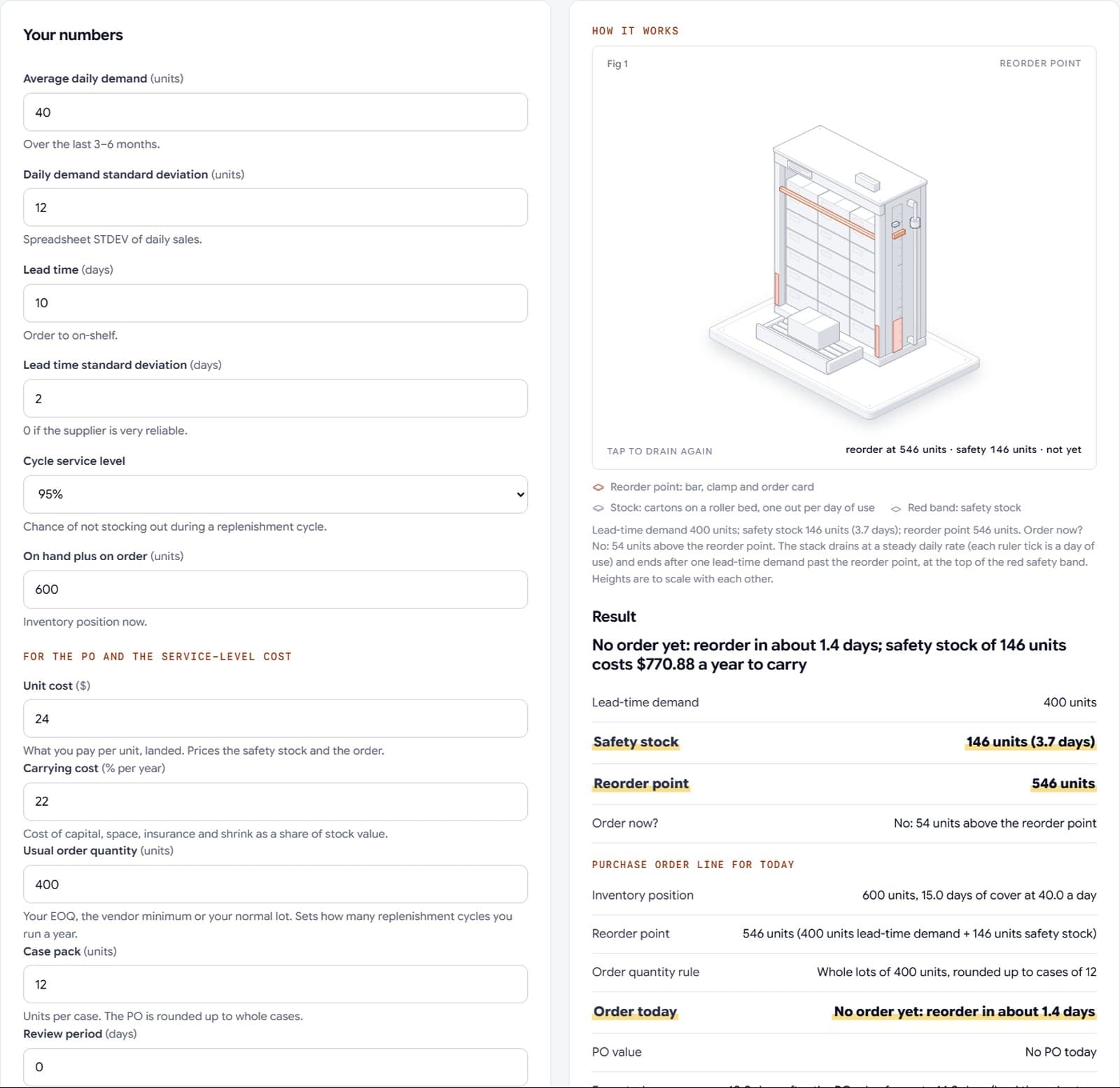
Forge's Reorder point and safety stock tool takes six inputs:
- Average daily demand, over the last three to six months
- The standard deviation of daily demand, the spreadsheet STDEV of daily sales
- Lead time in days, from order to on-shelf
- The lead-time standard deviation, or 0 if the supplier is very reliable
- The cycle service level, picked from a short list
- On hand plus on order, your inventory position now
It returns the lead-time demand, the safety stock in units and in days of cover, the reorder point, and a plain answer to "Order now?". With the sample inputs (40 units a day, a spread of 12, a 10-day lead time give or take 2 days, at the default service level), it sets safety stock at 146 units and the reorder point at 546. With 600 units in position, the answer is no: you're 54 units above the reorder point.
Under the result, it prints the formula it used, with the z value, and the assumption behind it: demand is roughly normal and independent from day to day. It also says where the method falls short. For seasonal, promotional or lumpy items, a forecast-based method is the better fit, and the parameters should be reviewed monthly.
From a number to a purchase order
A reorder point on its own doesn't place an order. The tool adds a few inputs that turn the answer into today's work: unit cost, carrying cost, your usual order quantity, the case pack, the review period and what a unit short costs you. With those, it lays out:
- The order line for today. Whole lots of your usual quantity, rounded up to full cases. If you review the item on a fixed cycle, such as once a week, it switches to an order-up-to level that covers the lead time plus the review period.
- What the safety stock costs to carry, and how many replenishment cycles you run a year.
- The fill rate your chosen service level gives, and roughly how many units you'd be short in a year.
- A service-level table. For each of the four levels: the safety stock, the fill rate, the carrying cost and the shortage cost. It marks the level that costs least once shortages are priced at the figure you entered.
Each figure shows the inputs behind it, and the references are linked: the MIT lecture, the original economic order quantity paper, the Federal Reserve's interest rate release for the capital part of carrying cost, and the Census Bureau's wholesale inventories-to-sales ratios as a yardstick for your trade. You can check the reasoning instead of trusting a black box.

Make it a weekly habit
The last barrier is consistency. Safety stock grows fast as demand and lead times become less predictable, so a reorder point set once and left alone drifts out of date. The tool's own next steps say it plainly: recalculate the demand and lead-time spread from the last three to six months each month, and check your order quantity against the economic order quantity.
The tool keeps your recent runs on your device, so next week you can open last week's numbers for the same item and see what changed. With an account, you can save a result to My work and pin the tool, so the review starts in the same place every time. A simple weekly routine:
- Pull average daily demand and its spread for your top items.
- Update lead times from the last few receipts.
- Run each item, and place the orders the tool flags.
- Once a month, review the service-level table and move items whose cheapest level has changed.
This is Applied Intelligence at a planning desk: clear math you can check, inside a routine you already run, kept current every week.
Your next step
The Reorder point and safety stock tool is open to everyone on Forge: it's the free tool for the supply chain planner and data scientist roles, and you don't need an account to run it. Try it on one item you know well, compare the result with your current reorder point, and read the assumptions before you change anything.
Open the Reorder point and safety stock tool, or browse every Forge - Labs toolkit for engineers, analysts and planners. For more on using AI at a desk without losing control of your numbers, read AI tools for engineers and analysts. If you run the whole operation, AI for supply chain covers the company side.
Frequently asked questions
How do you calculate a reorder point?
The reorder point is lead-time demand plus safety stock, where lead-time demand is average daily demand times the lead time in days. With the sample inputs in this guide, 40 units a day and a 10-day lead time, lead-time demand is 400 units, and adding 146 units of safety stock gives a reorder point of 546.
What is the safety stock formula when demand and lead time both vary?
A common formula is z × √(LT × σd² + d² × σLT²), where d is average daily demand, σd its standard deviation, LT the lead time in days and σLT the lead-time standard deviation. The z value comes from the cycle service level you choose. The method assumes demand is roughly normal and independent from day to day.
What is the difference between cycle service level and fill rate?
Cycle service level is the chance of not running out during one replenishment cycle. Fill rate is the share of units you ship from stock, and it's usually higher than the cycle service level. The Reorder point and safety stock tool shows both, with what each level costs to carry, so you can compare them side by side.
How often should I recalculate the reorder point and safety stock?
Recalculate the demand and lead-time spread from the last three to six months every month, because a reorder point set once drifts out of date as demand and lead times change. A weekly run of your top items keeps orders current. For seasonal, promotional or lumpy items, a forecast-based method is the better fit.